Facebook Ads in 0DETECT: How to Prepare a Working Environment
Buying or registering a Facebook account is only the beginning. The stability of future sessions depends on the entire working environment: email access, two-factor authentication, cookies, proxies, the browser fingerprint, and the actions performed after the first login.
Configuring these elements separately can easily create an inconsistent setup. For example, the account may be registered in France, the proxy may be located in Germany, the browser language may be Russian, and the time zone may point to another country. Facebook may treat such a session as unfamiliar or suspicious.
This article explains how to prepare a working environment for Facebook Ads in advance: what to check in an account, how to select supporting resources, how to configure a profile in an anti-detect browser, and how to keep the setup consistent as operations scale.
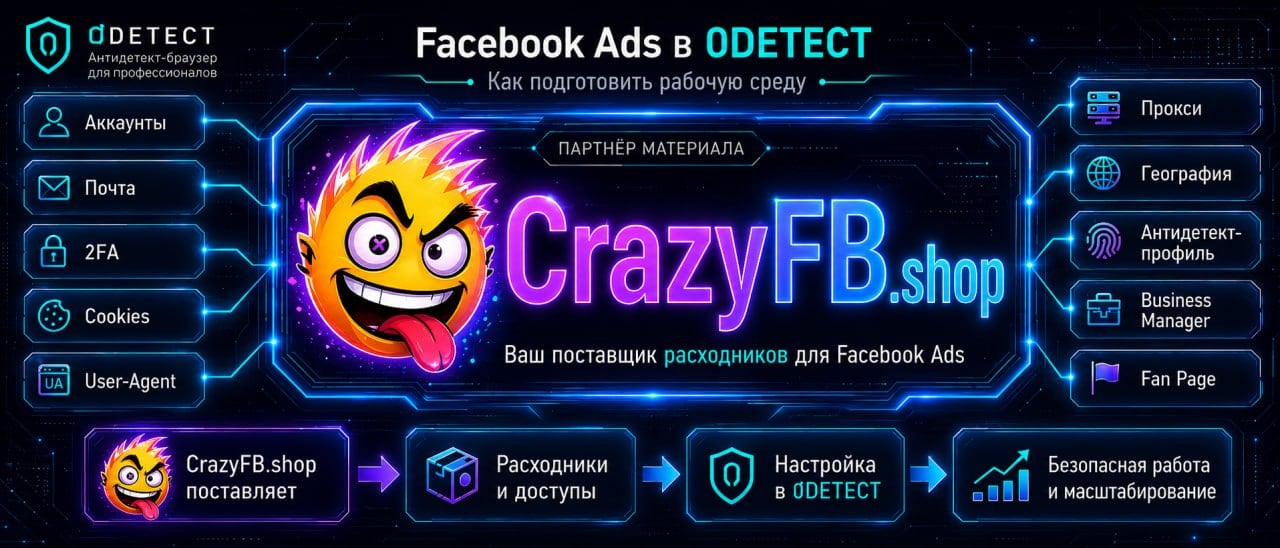
This article is published in partnership with CrazyFB.shop, a store offering Facebook and Instagram accounts, Business Manager, Fan Pages, mobile proxies, payment solutions, and other resources for launching advertising campaigns.
What a Facebook Ads Working Environment Includes
An anti-detect browser does not operate separately from the account and its network connection. It is more useful to view the working setup as a sequence of components:
account and email
        ↓
2FA, cookies, and User-Agent
        ↓
proxy and location
        ↓
anti-detect browser profile
        ↓
Business Manager, Fan Page, and ad account
        ↓
payment method and operating history
A weak point in one component affects the entire system. An anti-detect browser cannot restore lost email access, turn an unstable proxy into a reliable one, or override an advertising platform’s rules. Its role is to create an isolated browser environment.
That is why preparation should begin with checking the source data, not with clicking the Launch button.
What to Check Before Adding an Account to an Anti-Detect Browser
The available data depends on the account type and seller, but the following items should be checked before the first login.
1. Email Access
Email is needed for more than receiving a code during the first login. Facebook may use it to confirm new sessions and send security notifications. It will also be required if access needs to be restored.
Make sure that:
- you have the email login and password;
- the mailbox can be opened independently of Facebook;
- no unknown recovery methods are attached to it;
- you understand whether the password and recovery contacts can be changed.
2. Two-Factor Authentication
If 2FA is enabled on the account, clarify its format in advance. It may be a TOTP secret, backup codes, or another confirmation method.
Do not postpone checking 2FA until Facebook requests a code. First make sure that you can use it.
3. Cookies and User-Agent
Accounts may be supplied with cookies and a User-Agent.
Cookies do not replace the password. They help preserve the previous session so that the login does not look completely new to Facebook. The User-Agent is also configured in the profile and should match the device previously used to access the account.
If cookies are unavailable, logging in may be more difficult and Facebook may assign less trust to the profile.
4. Account Location and History
Before configuring the proxy, clarify:
- the country where the account was registered or the location most commonly used for previous logins;
- whether a proxy is supplied with the account.
The proxy location, time zone, browser language, and geolocation should form a logical combination. 0DETECT automatically selects these parameters based on the external IP address.
Buying for a Specific Scenario: What to Confirm Before Payment
It is more practical to assemble the infrastructure for a specific task than to select every component solely by its lowest price. One scenario may require an account with email access and 2FA, another may require Business Manager or a Fan Page, and a third may need a mobile proxy from a particular location.
The CrazyFB.shop catalog includes:
- automatically registered and prepared Facebook accounts;
- accounts with Business Manager;
- standalone Business Manager options and advertising solutions;
- Fan Pages and Instagram accounts;
- mobile proxies;
- payment cards and other resources for advertising operations.
The advantage of a full-service store is that the resources can be selected as one setup: account, BM, page, and proxy.
How to Create a Facebook Profile in 0DETECT
Once the account data and proxy are ready, you can build the browser profile. In 0DETECT, each account receives an isolated environment with its own cookies, localStorage, connection settings, and history.
Step 1. Create a Separate Profile
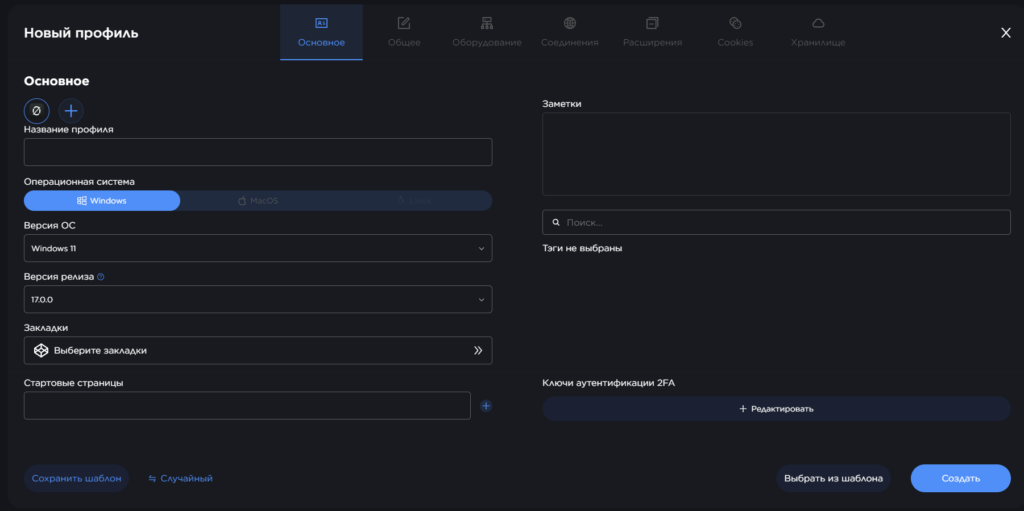
Create a new profile and give it a clear name. You can use any naming format that works for your team.
Example:
fb-fr-client-a-admin-01
fb-de-project-b-page-01
fb-us-agency-backup-01
Including the platform, location, project, role, and sequence number in the name makes a large account pool easier to manage.
For more details, see the 0DETECT documentation.
Step 2. Configure the Main Profile Settings
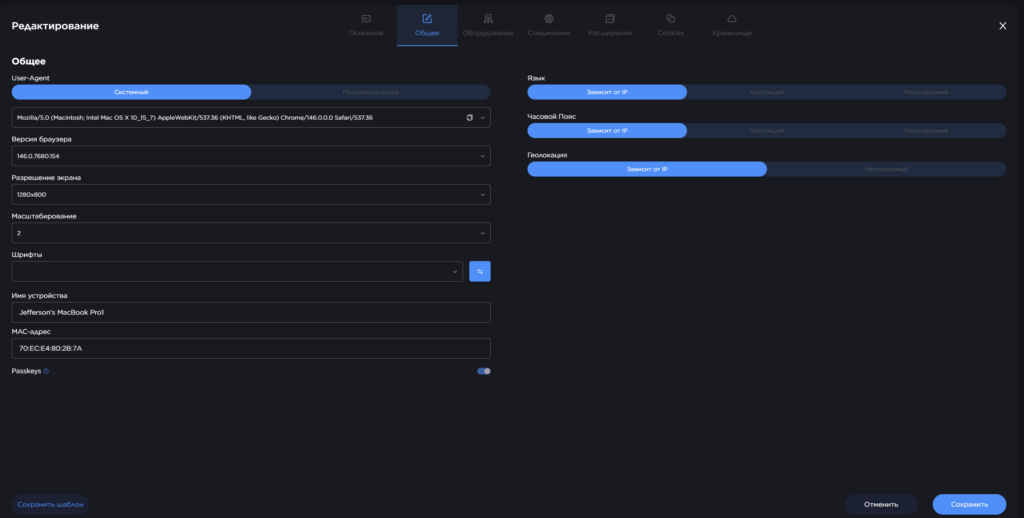
Check the following profile settings:
- operating system and User-Agent;
- browser language;
- time zone;
- geolocation;
- screen resolution;
- WebGL and hardware parameters;
- WebRTC and DNS settings.
Some of these parameters are configured automatically based on the proxy and selected User-Agent. However, you should still check them to make sure that the proxy and account have not been mixed up.
Step 3. Connect the Proxy Before the First Login
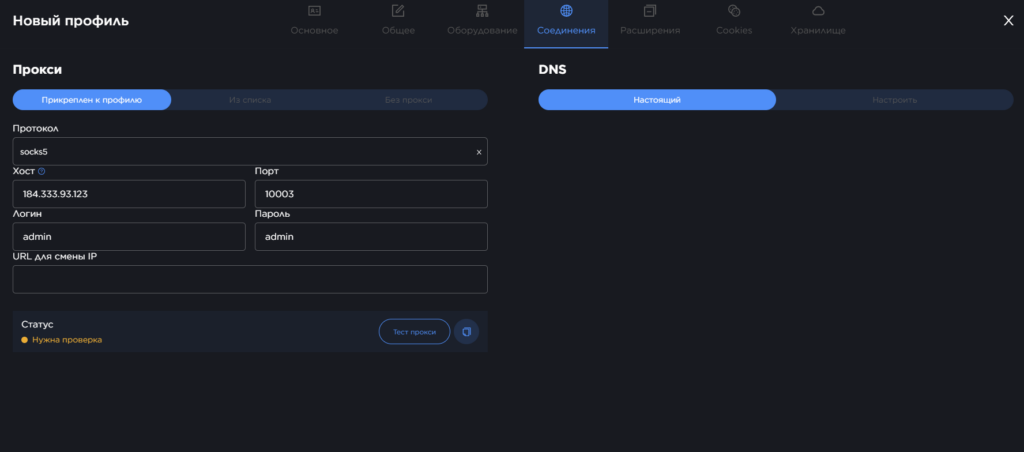
The proxy should be configured before the profile is launched for the first time.
In 0DETECT, a proxy can be saved separately and then linked to a profile. This is more convenient for long-term setups because the team can see which IP address is assigned and is less likely to make mistakes when entering the data again. Instructions are available in the Creating a Proxy section.
Do not use the same proxy for several profiles. This creates a shared point of connection between them.
Step 4. Import Cookies
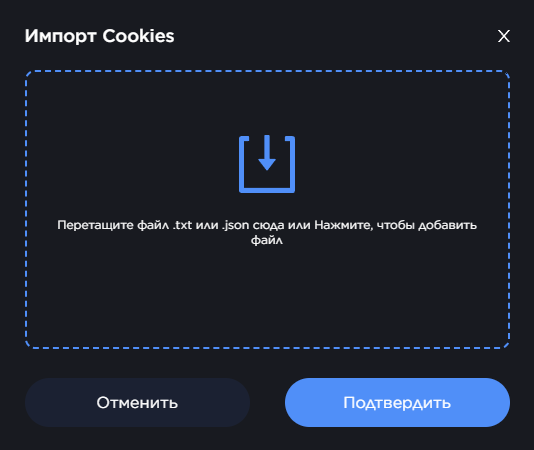
0DETECT supports cookie imports in .txt and .json formats. Import only the cookies that belong to the specific account and were supplied with it. Do not mix files from different orders or profiles.
Do not assume that the account is already authenticated after the import. Facebook may still request the password, 2FA, or email confirmation.
Step 5. Complete the First Login Without Sudden Changes
Before the first login, confirm that the profile is using the correct IP address, language, and time zone. Only then should you open Facebook.
How to Scale Operations Across Multiple Accounts
As a team grows, confusion between profiles becomes a greater risk than any individual setting. Separate the working environments in advance to avoid this problem.
One Profile, One Clear Role
Do not add unrelated Facebook accounts to the same browser profile. Cookies, localStorage, browsing history, and website permissions should belong to one Facebook account.
If several accounts officially work with the same Business Manager, that relationship already exists on the platform. However, it does not mean that their browser sessions should be mixed inside one profile.
Conclusion
A reliable Facebook Ads environment is not built around one “good account” or one anti-detect browser. It consists of several connected elements: email access, 2FA, account history, proxy, browser profile, Business Manager, pages, and the payment infrastructure.
Accounts and supporting resources can be selected through CrazyFB.shop, while 0DETECT can be used to separate sessions and preserve browser profiles.
Recent Articles

Make your work fast and secure with 0DETECT Browser