Headless Chrome in Automation: What Actually Gives a Bot Away
Headless Chrome is not “bad” by itself. It is a normal Chrome mode without a visible window. People use it for testing, PDF generation, screenshots, monitoring, and internal automation.
Problems start elsewhere: when a browser running in headless mode is presented as an ordinary user on a website with anti-fraud checks. At that point, the website does not look at one parameter, but at the whole picture: how the browser is launched, who controls it, which APIs are available, what the graphics look like, whether the network matches the profile, and whether there are signs that Playwright, Puppeteer, or Selenium is driving it.
An important note: old articles about Headless Chrome go stale. Google updated headless mode in Chrome 112. Chrome now creates real platform windows, it just does not display them. Chrome documentation says this directly: Chrome Headless mode. The same documentation also notes that the old headless mode was moved into a separate chrome-headless-shell starting with Chrome 132. So the fair way to describe the situation today is this: new Headless Chrome is closer to regular Chrome, but automation still leaves its own traces.
The First Obvious Signal: navigator.webdriver
navigator.webdriver is a standard automation signal.
The W3C WebDriver specification includes a section about the webdriver flag: WebDriver specification. MDN explains it more simply: the navigator.webdriver property indicates that the user agent is controlled by automation, and in Chrome it becomes true, for example with --enable-automation, --headless, or some remote debugging variants: Navigator.webdriver.
For a normal QA test, that is fine. For accounts, payments, ad cabinets, marketplaces, and other risk-based systems, it is a strong signal. It may not be the only one. But if a site sees navigator.webdriver === true, it no longer needs to guess for long what it is dealing with.
Why Simply Hiding webdriver Is Not Enough
Many people begin with a simple patch:
Object.defineProperty(navigator, 'webdriver', {
  get: () => undefined
})
The problem is that a site can look deeper. It can inspect prototypes, properties, iframe behavior, errors, stack traces, plugins, the PDF viewer, WebGL, window dimensions, media devices, and dozens of other small details.
And the main point is this: if you fix one parameter but break consistency, the result gets worse. For example:
navigator.webdriveris hidden, but the CDP client is still detectable;- the User-Agent looks like regular Chrome, but the HTTP headers still look strange;
- the profile claims to be macOS, but WebGL and fonts look like a Linux container;
- viewport,
screen,outerWidth, touch signals, and device scale factor do not line up with one another.
This idea is clearly visible in the FP-Inconsistent research. The authors studied evasive bot traffic and showed that bots are often exposed not by one “red flag,” but by inconsistent fingerprint attributes both against each other and over time.
CDP: The Invisible Control Panel That Can Also Be Noticed
Puppeteer and Playwright mainly control Chromium through the Chrome DevTools Protocol. This is the official protocol for inspecting, debugging, and controlling the browser: Chrome DevTools Protocol. Chrome DevTools documentation also states directly that DevTools uses CDP to instrument, inspect, debug, and profile browsers: Protocol monitor.
CDP is convenient for developers. For anti-bot systems, it is an important inspection layer.
In a 2024 write-up, DataDome says that the new Headless Chrome became much closer to regular Chrome from a fingerprint perspective, which is why attention shifted toward CDP signals: How New Headless Chrome & the CDP Signal Are Impacting Bot Detection. The idea is simple: if the browser looks almost normal, the site stops searching for “headless” as such and starts looking for signs that the browser is being controlled by automation.
CDP detection also changes over time, and some older methods stop working. Castle, for example, analyzed why one classic CDP signal suddenly broke over time: Why a classic CDP bot detection signal suddenly stopped working. But the overall conclusion remains the same: the browser control layer is a separate detection surface.
Why Stealth Plugins Do Not Solve the Problem Forever
puppeteer-extra-plugin-stealth and similar libraries are useful as a quick layer of evasions. They patch known signals: navigator.webdriver, navigator.plugins, the WebGL vendor, chrome.runtime, iframe.contentWindow, codecs, and other things. You can see this directly in the project README: puppeteer-extra-plugin-stealth.
But this approach remains reactive. First a detection appears, then someone writes an evasion for it. Then the anti-bot system checks the evasion itself or looks for a new side effect. It is the usual arms race.
DataDome also published a separate analysis of detecting Puppeteer Extra Stealth via JavaScript browser fingerprinting: Detecting Headless Chrome’s Puppeteer Extra Stealth Plugin. You do not have to agree with every detail in the article. The important part is the basic fact: a public stealth plugin is a public project. Both sides can read its code.
What Most Often Gives Headless Automation Away
In practice, “headless gets detected” usually does not mean one specific flag. It means a set of small inconsistencies.
The most common groups of signals are:
- automation flags:
navigator.webdriver, launch flags, remote debugging; - CDP and DevTools methods;
- WebGL and Canvas that do not match the claimed OS and device;
- empty or unusual
plugins,mimeTypes, the PDF viewer, and media devices; - unnatural window and screen dimensions;
- lack of normal profile history, cookies, storage, and permissions;
- network inconsistencies: IP, DNS, WebRTC, time zone, locale;
- behavior: overly even timing, instant clicks, identical scenarios.
So changing the User-Agent and proxy does not turn headless into a real user. It only changes two parameters inside a much larger scoring system.
How We Approach Automation in 0detect
At 0detect, we do not try to “hide headless” with a single setting. Our goal is to give automation a coherent browser profile.
In practice, this looks like this: automation does not launch an empty browser “from scratch,” but a specific 0detect profile. Our Local API documentation shows the basic flow: first get a profile ID, then launch the browser by that ID, after which 0detect returns devToolsActivePort. Selenium or another automation client can then connect to that port: Run Browser.
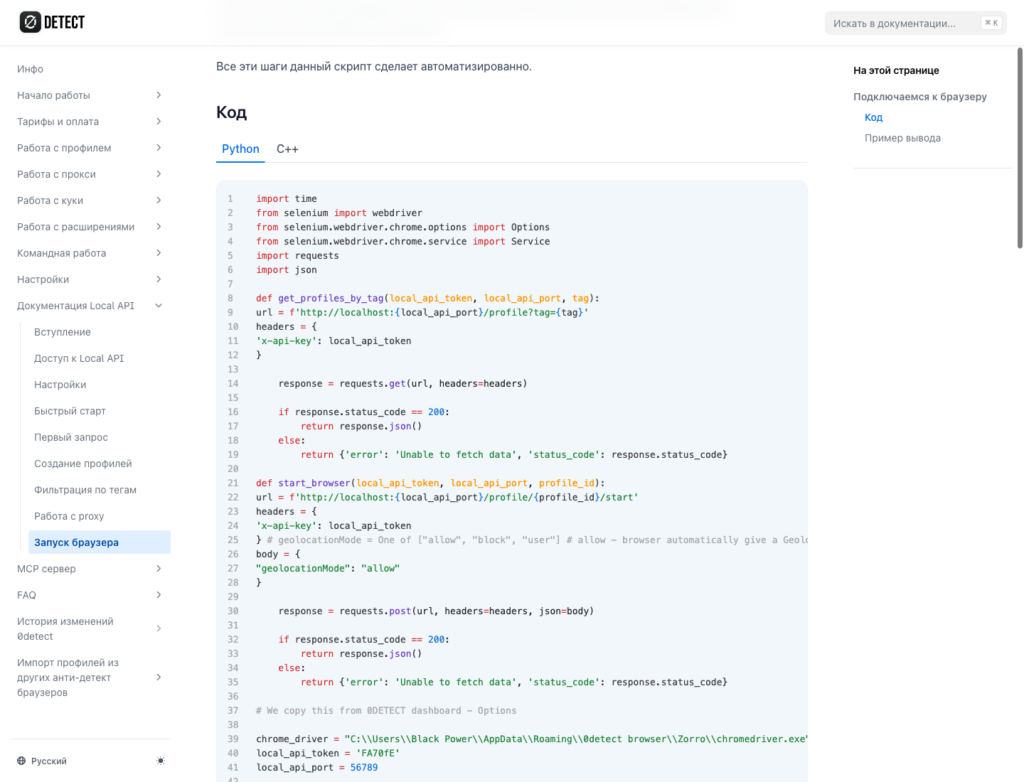
That means Selenium, Playwright, Puppeteer, or another automation client handles the business logic: open a page, click a button, fill a form, collect data. The profile layer is responsible for making the browser look consistent:
- the same profile keeps a stable fingerprint;
- graphics, fonts, screen, language, time zone, and network are aligned with each other;
- automation patterns are not “fixed” with random JS patches inside the page;
- proxy, DNS, and WebRTC all follow the same logic as the profile;
- behavior can be scaled without turning all sessions into copies of each other.
Local API also supports working with proxies: create a proxy, attach it to the profile via POST /profile/set/proxy, and only then launch the browser: Proxy. That matters for automation because network settings should be part of the profile before launch, not a random layer added on top of an already running Chrome instance.
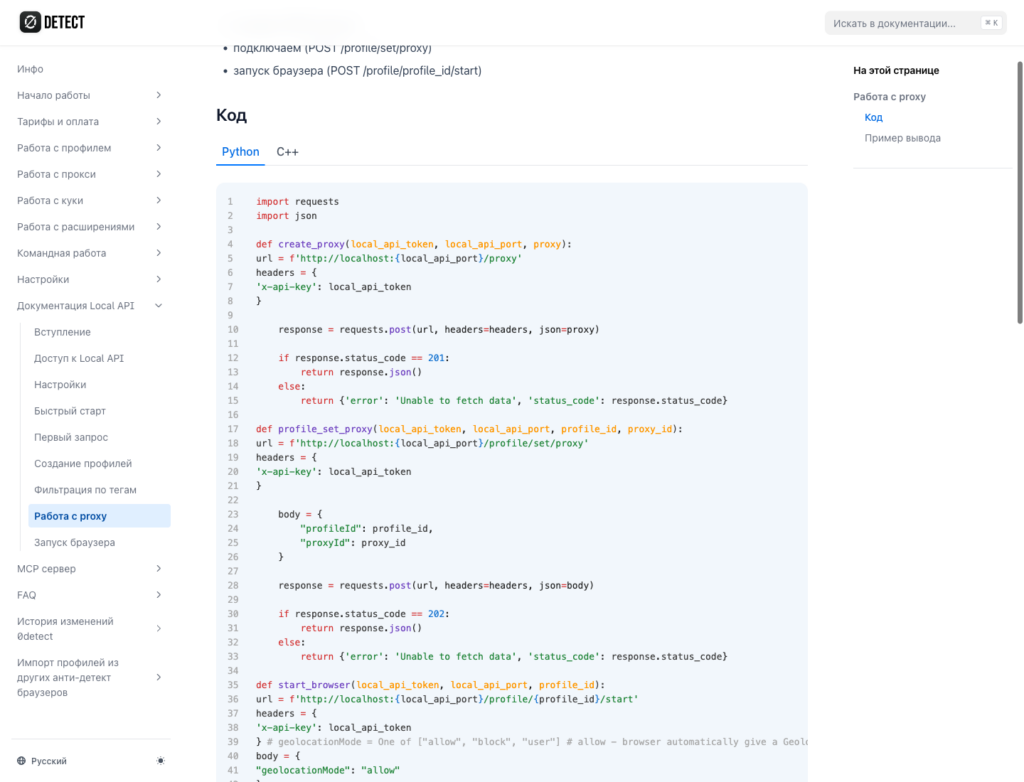
This matters especially for long-lived accounts. A one-off script may sometimes get lucky. But if a profile has to live for weeks, return to the same site, keep history, and avoid extra checks, it needs stability.
Summary
Headless Chrome has improved. The old thesis that “headless is always easy to detect” is now too crude. New headless mode is closer to regular Chrome, and Chrome’s own documentation confirms that.
But “closer” does not mean “indistinguishable.” Automation is still visible through navigator.webdriver, CDP, inconsistent fingerprint attributes, network leaks, and behavior.
A sensible strategy is not to patch one flag after another, but to build a coherent profile: the browser, graphics, network, storage, timing, and automation layer should all look like one real environment.
Recent Articles

Make your work fast and secure with 0DETECT Browser