Headless Chrome в автоматизации: что реально выдаёт бота
Headless Chrome сам по себе не «плохой». Это нормальный режим Chrome без видимого окна. Его используют для тестов, генерации PDF, скриншотов, мониторинга и внутренней автоматизации.
Проблемы начинаются в другом месте: когда браузер в режиме headless пытаются выдать за обычного пользователя на сайте с антифродом. Тогда сайт смотрит не на один параметр, а на всю картину: как запущен браузер, кто им управляет, какие API доступны, как выглядит графика, совпадает ли сеть с профилем, есть ли признаки работы под управлением Playwright/Puppeteer/Selenium.
Важно: старые статьи про Headless Chrome устаревают. Google обновил headless-режим в Chrome 112: теперь Chrome создаёт настоящие платформенные окна, просто не показывает их. В документации Chrome это описано прямо: Chrome Headless mode. Там же указано, что старый headless с Chrome 132 вынесен в отдельный chrome-headless-shell. Поэтому сегодня честнее говорить так: новый Headless Chrome стал ближе к обычному Chrome, но автоматизация всё равно оставляет свои признаки.
Первый очевидный сигнал: navigator.webdriver
navigator.webdriver — Это стандартный сигнал автоматизации.
В спецификации W3C WebDriver есть раздел про webdriver-флаг: WebDriver specification. MDN объясняет проще: свойство navigator.webdriver показывает, что user agent контролируется автоматизацией, а в Chrome оно становится true, например, при --enable-automation, --headless или некоторых вариантах remote debugging: Navigator.webdriver.
Для обычного QA-теста это нормально. Для аккаунтов, платежей, рекламных кабинетов, маркетплейсов и других risk-based систем — это сильный сигнал. Не обязательно единственный. Но если сайт видит navigator.webdriver === true, ему уже не нужно долго гадать, что перед ним.
Почему просто скрыть webdriver недостаточно
Многие начинают с простого патча:
Object.defineProperty(navigator, 'webdriver', {
  get: () => undefined
})
Проблема в том, что сайт может смотреть глубже. Он может проверять прототипы, свойства, поведение iframe, ошибки, stack trace, плагины, PDF viewer, WebGL, размеры окна, media devices и десятки других мелочей.
И главное: если вы исправили один параметр, но сломали согласованность, стало хуже. Например:
navigator.webdriverскрыт, но CDP-клиент всё ещё можно определить;- User-Agent похож на обычный Chrome, но HTTP-заголовки идут странно;
- профиль заявляет macOS, а WebGL и шрифты похожи на Linux-контейнер;
- viewport,
screen,outerWidth, touch-сигналы и device scale factor не сходятся между собой.
Эта тема хорошо видна в исследовании FP-Inconsistent. Авторы изучали evasive bot traffic и показали, что боты часто палятся не одним «красным флагом», а несогласованностью fingerprint-атрибутов между собой и во времени.
CDP: невидимый пульт управления, который тоже можно заметить
Puppeteer и Playwright управляют Chromium в основном через Chrome DevTools Protocol. Это официальный протокол для инспекции, отладки и управления браузером: Chrome DevTools Protocol. В документации Chrome DevTools также прямо сказано, что DevTools использует CDP для instrument/inspect/debug/profile браузеров: Protocol monitor.
Для разработчика CDP удобен. Для антибота это важный слой проверки.
DataDome в разборе 2024 года пишет, что новый Headless Chrome стал намного ближе к обычному Chrome по fingerprint, а потому внимание сместилось к CDP-сигналам: How New Headless Chrome & the CDP Signal Are Impacting Bot Detection. Смысл простой: если браузер почти похож на обычный, сайт начинает искать не “headless” как таковой, а признаки того, что браузером управляет автоматизация.
CDP-детект тоже меняется, некоторые старые методы перестают работать. Castle, например, разбирал, почему один классический CDP-сигнал со временем сломался: Why a classic CDP bot detection signal suddenly stopped working. Но общий вывод остаётся: слой управления браузером — отдельная поверхность детекта.
Почему stealth-плагины не решают проблему навсегда
puppeteer-extra-plugin-stealth и похожие библиотеки полезны как быстрый слой evasions. Они патчат известные признаки: navigator.webdriver, navigator.plugins, WebGL vendor, chrome.runtime, iframe.contentWindow, codecs и другие вещи. Это видно даже из README проекта: puppeteer-extra-plugin-stealth.
Но такой подход остаётся реактивным. Сначала появляется детект, потом под него пишут evasion. Потом антибот проверяет сам evasion или ищет новый побочный эффект. Это обычная гонка.
DataDome отдельно разбирал детект Puppeteer Extra Stealth через JavaScript browser fingerprinting: Detecting Headless Chrome’s Puppeteer Extra Stealth Plugin. Не важно, соглашаться ли с каждой деталью статьи. Важен сам факт: публичный stealth-плагин — это публичный проект. Его код могут читать обе стороны.
Что чаще всего выдаёт headless-автоматизацию
На практике “палится headless” обычно означает не один конкретный флаг, а набор мелких несостыковок.
Самые частые группы сигналов:
- automation-флаги:
navigator.webdriver, launch flags, remote debugging; - CDP/DevTools-методы;
- WebGL/Canvas, которые не совпадают с заявленной ОС и устройством;
- пустые или странные
plugins,mimeTypes, PDF viewer, media devices; - неестественные размеры окна и экрана;
- отсутствие нормальной истории профиля, cookies, storage, permissions;
- сетевые несостыковки: IP, DNS, WebRTC, timezone, locale;
- поведение: слишком ровные тайминги, мгновенные клики, одинаковые сценарии.
Поэтому замена User-Agent и прокси не превращает headless в живого пользователя. Она просто меняет два параметра в большой системе скоринга.
Как мы подходим к автоматизации в 0detect
В 0detect мы не пытаемся “спрятать headless” одной настройкой. Наша задача — дать автоматизации цельный браузерный профиль.
Практически это выглядит так: автоматизация запускает не пустой браузер “с нуля”, а конкретный профиль 0detect. В нашей документации по Local API показан базовый сценарий: сначала получить ID профиля, затем запустить браузер по этому ID, после чего 0detect возвращает devToolsActivePort. К этому порту уже можно подключить Selenium или другой automation-клиент: Запуск браузера.
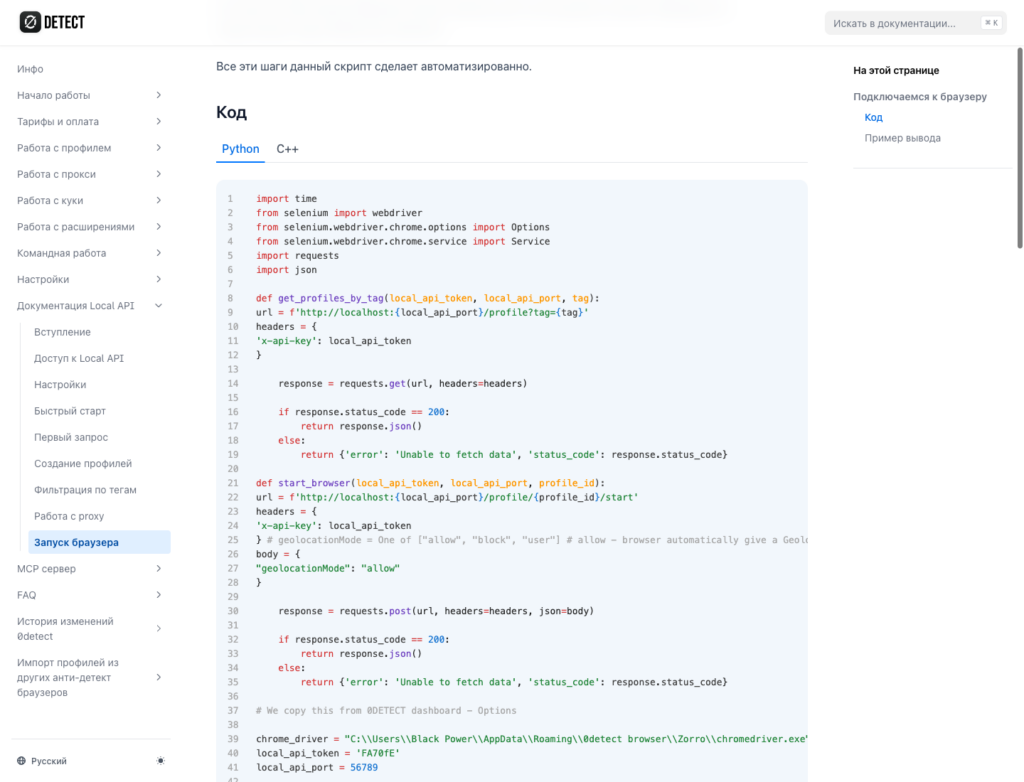
То есть Selenium, Playwright, Puppeteer или другой automation-клиент отвечают за бизнес-логику: открыть страницу, нажать кнопку, заполнить форму, собрать данные. А слой профиля отвечает за то, чтобы браузер выглядел согласованно:
- один и тот же профиль сохраняет стабильный отпечаток;
- графика, шрифты, экран, язык, таймзона и сеть согласованы друг с другом;
- automation-паттерны не лечатся случайными JS-патчами на странице;
- прокси, DNS и WebRTC идут в одной логике с профилем;
- поведение можно масштабировать без превращения всех сессий в копии друг друга.
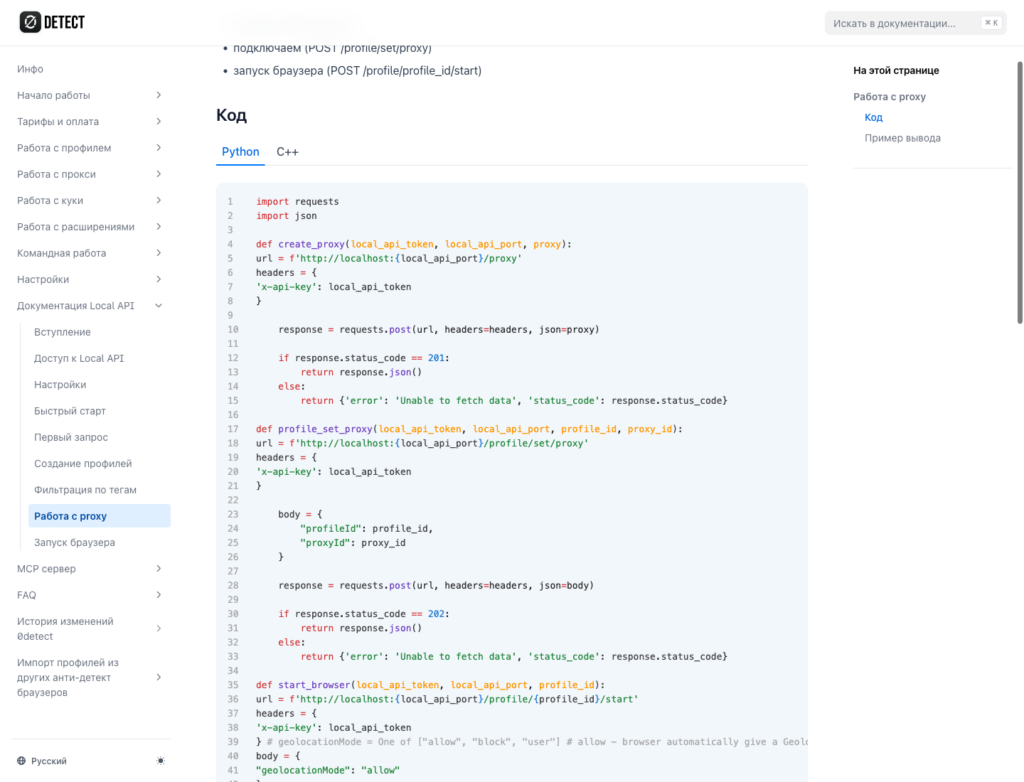
Отдельно в Local API есть возможность работы с прокси: создать proxy, привязать его к профилю через POST /profile/set/proxy, затем стартовать браузер: Работа с proxy. Это важно для автоматизации, потому что сетевые настройки должны быть частью профиля до запуска, а не случайной настройкой поверх уже открытого Chrome.
Это особенно важно для долгоживущих аккаунтов. Одноразовый скрипт может иногда пройти на удаче. Но если профиль должен жить неделями, возвращаться на тот же сайт, хранить историю и не вызывать лишних проверок, ему нужна стабильность.
Итого
Headless Chrome стал лучше. Старый тезис “headless всегда легко детектится” уже слишком грубый. Новый headless ближе к обычному Chrome, и это подтверждает документация Chrome.
Но “ближе” не значит “неотличим”. Автоматизация всё ещё видна через navigator.webdriver, CDP, несогласованность fingerprint-атрибутов, сетевые утечки и поведение.
Нормальная стратегия — не латать один флаг за другим, а строить цельный профиль: браузер, графика, сеть, storage, тайминги и automation-слой должны выглядеть как одна реальная среда.
Недавние статьи

Сделайте свою работу быстрой и безопасной с помощью 0DETECT Browser